CernVM-FS Graph Driver Plugin for Docker
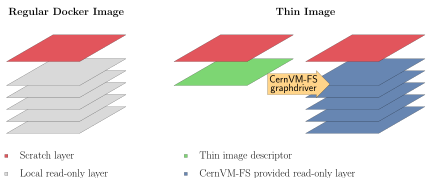
The CernVM-FS graph driver plugin for Docker provides a dockerized CernVM-FS client that can be used by the Docker daemon to access and store container images that reside in an extracted form on a CernVM-FS repository. Because CernVM-FS downloads the files of a container image only when accessed and because typically very little of a container image is accessed at runtime, the CernVM-FS graph driver can remove the bottleneck of distributing (large) container images to (many) nodes.
The CernVM-FS graph driver can run any normal image from a Docker
registry. Additionally, it can run so-called Thin Images. A thin image
is like a symbolic link for container images. It is a regular, very
small image in the registry. It contains a single file, the thin image
descriptor, that specifies where in a CernVM-FS repository the actual
image contents can be found. The docker2cvmfs utility can be used to
convert a regular image to a thin image.
Requirements
The graph driver plugin requires Docker version > 17 and a host kernel
with overlay2 support, which includes RHEL >= 7.3. Please note that on
RHEL 7, Docker's data root should reside either on an ext file system
or on an xfs file system that is formatted with the ftype=1 mount
option.
The Docker graph driver plugin receives its CernVM-FS configuration by
default from the Docker host's /etc/cvmfs directory. The easiest way
to populate /etc/cvmfs is to install the cvmfs-config-default
package (or any other cvmfs-config-... package) on the Docker host.
Alternatively, a directory structure resembling the /etc/cvmfs
hierarchy can be manually created and linked to the graph driver plugin.
Installation
The following steps install and activate the CernVM-FS graph driver plugin.
Install the plugin with
docker plugin install cvmfs/graphdriver. The commanddocker plugin lsshould now show the new plugin as being activated.Create or edit the file
/etc/docker/daemon.jsonso that it contains the following content :{ "experimental": true, "storage-driver": "cvmfs/graphdriver", // To change the docker data root to an ext formatted location (remove this line) "data-root": "/path/to/ext/mountpoint", // Add the following storage option on RHEL 7 (remove this line) "storage-opts": [ "overlay2.override_kernel_check=true" ] }Restart the Docker daemon with
systemctl restart docker.Test the new plugin with a normal image :
docker run -it --rm ubuntu /bin/bashand with a thin image :
docker run -it --rm cvmfs/thin_ubuntu /bin/bash
In order to get debugging output, add "debug": true to the
/etc/docker/daemon.json file.
Location of the Plugin Configuration
By default, the plugin tries to bind mount the host's /etc/cvmfs
directory as a source of configuration. Other locations can be linked to
the container by running :
docker plugin set cvmfs/graphdriver cvmfs_ext_config="/alternative/location"
docker plugin set cvmfs/graphdriver minio_ext_config="/alternative/location"
Installation from a Plugin Tarball
Instead of installing the plugin from the Docker registry, it can be installed directly from a tarball. To do so, download and untar a graph driver plugin tarball. Run :
docker plugin create my-graphdriver cvmfs-graphdriver-plugin-$VERSION
docker plugin enable my-graphdriver
Note
Currently, the graph driver name (my-graphdriver) must not contain a
colon (:) nor a comma (,). This issue will be fixed in a later
version.
Conversion of Images
A simple way to ingest docker images inside a cvmfs repository is
available through a small utility docker2cvmfs.
At the moment it is possible to directly download the executable: docker2cvmfs v0.3
docker2cvmfs provides different commands to manipulate docker images,
though the simplest way is to use the make-thin subcommand.
This subcommand expects to find on the host machine a recent version of
cvmfs_server that supports the ingest command.
Invoking the help of the subcommand docker2cvmfs make-thin --help
explains what options are available and how to use them.
Below we provide a complete example on how to use docker2cvmfs to
convert the docker image of Redis into a thin image.
Assuming a cvmfs repository called example.cern.ch is already in
place:
./docker2cvmfs make-thin --input-reference library/redis:4 --output-reference thin/redis:4 --repository example.cern.ch
The utility takes as input the reference (library/redis:4) to the
image to ingest into cvmfs along with the reference to associate to
the new thin image (thin/redis:4) and the repository where we want to
store the several layers (example.cern.ch).
The utility downloads every layer that composes the image, stores them into the repository, creates the new thin image and imports that into docker.
By default, the layers are stored into the layers/ subdirectory of the
repository; this can be modified using the --subdirectory parameters.
The images are downloaded, by default, from the official docker hub
registry, this can be modified as well using the --registry parameter.